



Wednesday, June 9, 2004
By: Matthew Doucette
This article briefly describes how to converge your monitor's red, green, and blue electron beams. When properly converged, the three beams should hit exactly at the same spot, giving you the clearest possible picture your monitor can display. Most monitors' convergences are not optimized by default.
Monitor Convergence Image:
Set this image to be your background:
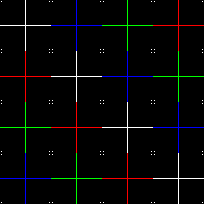
Set your background to be this image tiled.
If not already, set your desktop to display the image by tiling it. ("Display Properties", "Desktop" tab, "Position:", set to "Tile".)
It is not good enough to simply use the image above as displayed on this web page, as your monitor (more than likely) converges differently at different parts of your screen. You must use this image everywhere, completely covering all of your screen real estate.
Now clear everything out of the way and view your desktop. You can now easily adjust your monitor's convergence. The beauty of using this background image is that the red, green, and blue lines of this background will move instead of becoming blurry, because they are perfect red, perfect green, and perfect blue (255,0,0, 0,255,0, and 0,0,255). Also, because it is a one-pixel thick line on a black background, the white will actually split up into its red, green, and blue counterparts if you converge your monitor badly enough. It is nearly impossible to set your monitor's convergence with an alternate/typical background image. You can not detect the movement of the RGB beams with such an image, instead it becomes blurry due to all the colors made up of the three primary colors (red, green, and blue). Detecting this movement is necessary to align the colors perfectly.
Perfect Convergence?
Most monitors can not converge perfectly. Some covergence nearly perfect and others cannot come close. You might set the left side of your monitor perfectly, only to realize that the right side is way off. This is unfortunate, but true. Hopefully you can set your monitor's overall convergence better than it is now. Pay attention to all areas of your screen when adjusting the convergence, as you may have to sacrifice certain areas of your monitor to obtain overall maximum clarity. Also, converging your monitor generally only adjusts the red and blue, both at the same time, without modifying the green position. Sometimes when the red is perfectly converging with the green, the blue is still off. This means you cannot create a perfect convergence. You will have to try your best to make the red and blue the exact same distance away from the green. Do not choose to perfectly converge only one, as it will produce a worse picture.
Credit:
The image was modified from Tom's Hardware.
Also See:
About the Author: I am Matthew Doucette of Xona Games, an award-winning indie game studio that I founded with my twin brother. We make intensified arcade-style retro games. Our business, our games, our technology, and we as competitive gamers have won prestigious awards and received worldwide press. Our business has won $190,000 in contests. Our games have ranked from #1 in Canada to #1 in Japan, have become #1 best sellers in multiple countries, have won game contests, and have held 3 of the top 5 rated spots in Japan of all Xbox LIVE indie games. Our game engines have been awarded for technical excellence. And we, the developers, have placed #1 in competitive gaming competitions -- relating to the games we make. Read about our story, our awards, our games, and view our blog.